
In healthcare software, bad UI is not just an aesthetic problem. It is a patient safety problem, a revenue problem, and a staff retention problem — all wrapped in one form. When a lab technician has to squint at a truncated column header, guess what “InvTim” means, or scroll sideways to find a reference range that should always be visible, they make mistakes. And in a CBC workflow processing hundreds of samples a day, those mistakes compound.
This post is about why UI quality matters more in hospital software than almost anywhere else — and what the difference between bad and good actually looks like in practice, using a real example from a widely used LIS product in South Asia.
Why UI Quality Is a Clinical Issue, Not Just a Design Issue
Most enterprise software vendors treat UI as the last step in development — the visual layer painted over working logic. In healthcare, this mindset is dangerous. Clinical software interfaces are used under conditions of genuine stress: high patient volumes, time pressure, shift handovers, and staff with varying levels of digital literacy.
A poorly designed interface forces users to do cognitive work the software should be doing for them. Every ambiguous label, every truncated value, every field that combines two unrelated data points into one — these are not minor annoyances. They are friction points that slow workflows, train staff to make workarounds, and eventually produce errors.
The stakes in a lab setting are particularly high. A CBC result where the reference range is cut off, where the test method is impossible to read, or where the specimen field is blank — that result has reduced clinical value. And if a pathologist has to call the front desk to ask what specimen was used, that is time and trust the software has stolen from patient care.
A Real Example: a widely-used LIS CBC Data Entry Form
The screenshot below is from a widely-used LIS, a laboratory information system used in a number of South Asian healthcare facilities. The form shown is the CBC (Complete Blood Count) data entry screen — arguably the most-used interface in any diagnostic lab. It was shared with us by a lab manager who was evaluating alternatives.
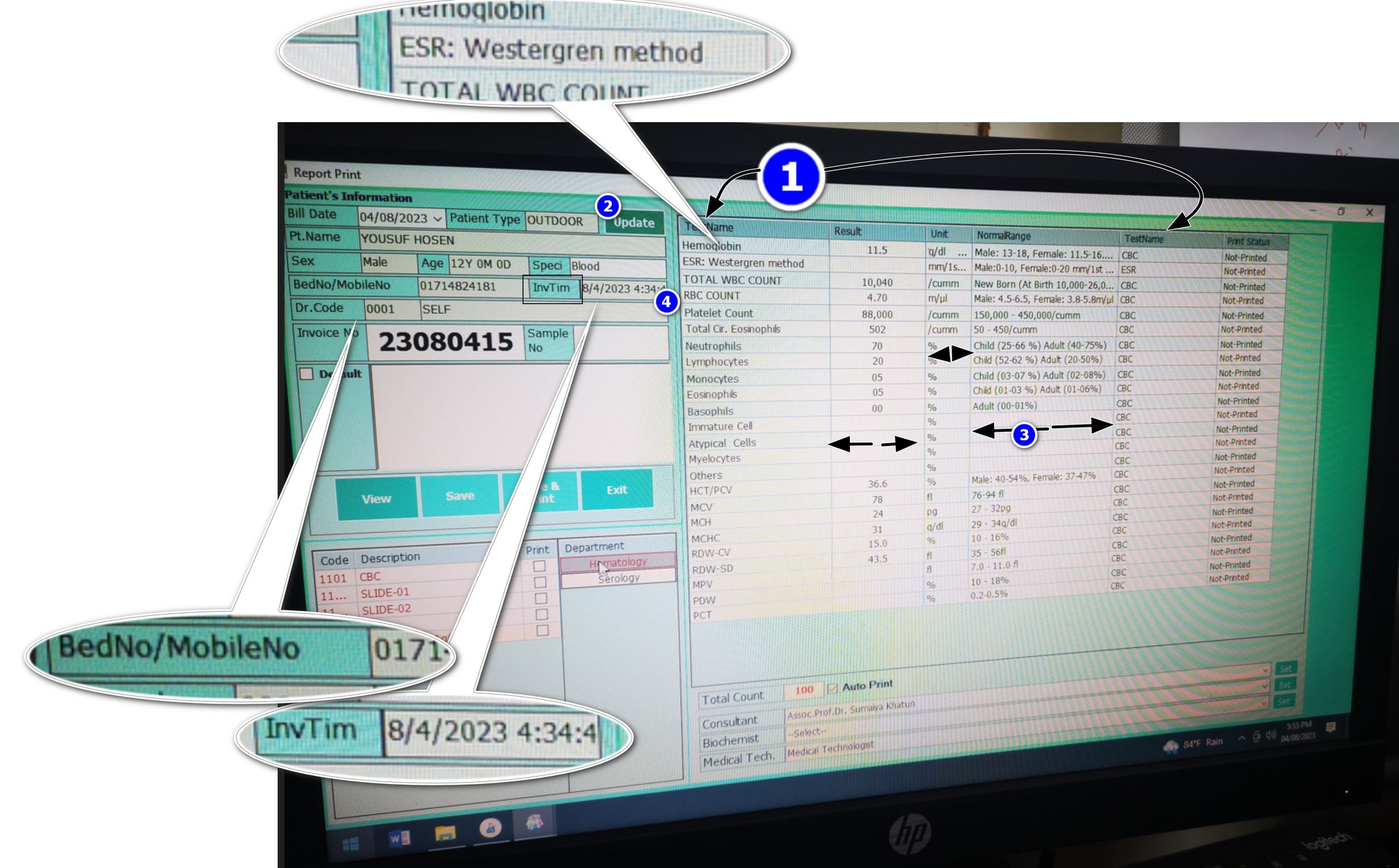
The form was built by someone who clearly understood the data model — they got all the right fields in. But the user experience suggests someone who did not consider how a real person, under real lab conditions, would interact with this screen eight hours a day. Let’s go through each problem systematically.
8 UI Failures in This Single Screen
-
1
Two columns with the same header: “TestName” Both “Report Name” and “Report Test Name” are labeled identically in the column header. The user has no way to know which column is which without prior training or trial and error. In a form used hundreds of times a day, this creates constant low-level confusion. It is the equivalent of labeling two different switches on a control panel with the same text — and then wondering why operators flip the wrong one.
-
2
Test and Test Method crammed into one column The test name and its associated method (e.g., SYSMEX 3-Part, Westergren, impedance) are forced into a single column. These are fundamentally different data points. Test name answers “what was measured.” Test method answers “how was it measured.” Collapsing them into one cell makes both harder to read, and makes filtering or sorting by method impossible. A second column costs nothing and removes the ambiguity permanently.
-
3
The Unit column is cut off while Results column has excess space Units are critical to interpreting any lab result. g/dL, %, ×10⁶/µL — without the unit, a result is a number with no meaning. In this form, the Unit column is truncated while the Results column occupies disproportionate horizontal space. This is a column-width allocation failure. The columns that matter most — Unit and Normal Range — should always be fully visible. The UI does the opposite.
-
4
BedNo and MobileNo jammed into the same field “BedNo / MobileNo: 0171—” — this is two completely different identifiers sharing one input field, separated by a slash. A bed number is a hospital admission location. A mobile number is a patient contact detail. They serve different workflows, different departments, and different downstream processes. Combining them into one field means neither can be reliably queried, validated, or used programmatically. It is likely a database shortcut that leaked into the UI.
-
5
“InvTim” — what does this mean? The label reads “InvTim 8/4/2023 4:34:4” — which, after some reasoning, appears to mean “Invoice Time.” But why is this abbreviated to a near-unreadable token? Abbreviations in UI labels are only acceptable when they are universally understood (like CBC, DOB, or ID). “InvTim” is not a standard abbreviation. It is a database column name that was never replaced with a real label. This tells you something important about how the software was built: the developer pasted field names directly from the schema into the UI and shipped it.
-
6
Preferred values (reference ranges) are cut off The reference range — the clinically critical comparison anchor for every result — is truncated in the visible columns. You can see partial values but cannot read the full range without manually expanding or hovering. This is not acceptable on a result entry form. Normal ranges must always be fully visible alongside the result. They are not supplementary information — they are the clinical context without which a result cannot be interpreted.
-
7
Specimen field is blank One of the most basic metadata fields in any lab result — the specimen type (Blood, Serum, Urine, CSF) — is empty. This could mean it was never entered, was not required by the system, or was lost. Any of these explanations represents a critical gap. A CBC performed on whole blood has different reference ranges and clinical interpretations than other specimen types. When a doctor or pathologist reviews this result, they need to know what was tested. A blank specimen field is an incomplete result.
-
8
Doctor ID shown — but why? The form displays a raw numeric “Doctor ID” field. From a clinical workflow perspective, this has zero value to the end user. Lab technicians do not refer to doctors by database ID numbers. This is a foreign key from the data model that was never translated into a human-readable label. The referring doctor’s name should be shown — not their internal system ID. Displaying raw IDs in clinical interfaces is a textbook example of building for the database, not for the person.
The Contrast: What Good Healthcare UI Looks Like
The screenshot below is the Medlogics CBC result entry form — the same clinical workflow, a completely different design philosophy. Note that this is not a comparison made to be promotional. It is made to be specific. The same 8 criteria that failed in a widely-used LIS can be evaluated against what Medlogics does.
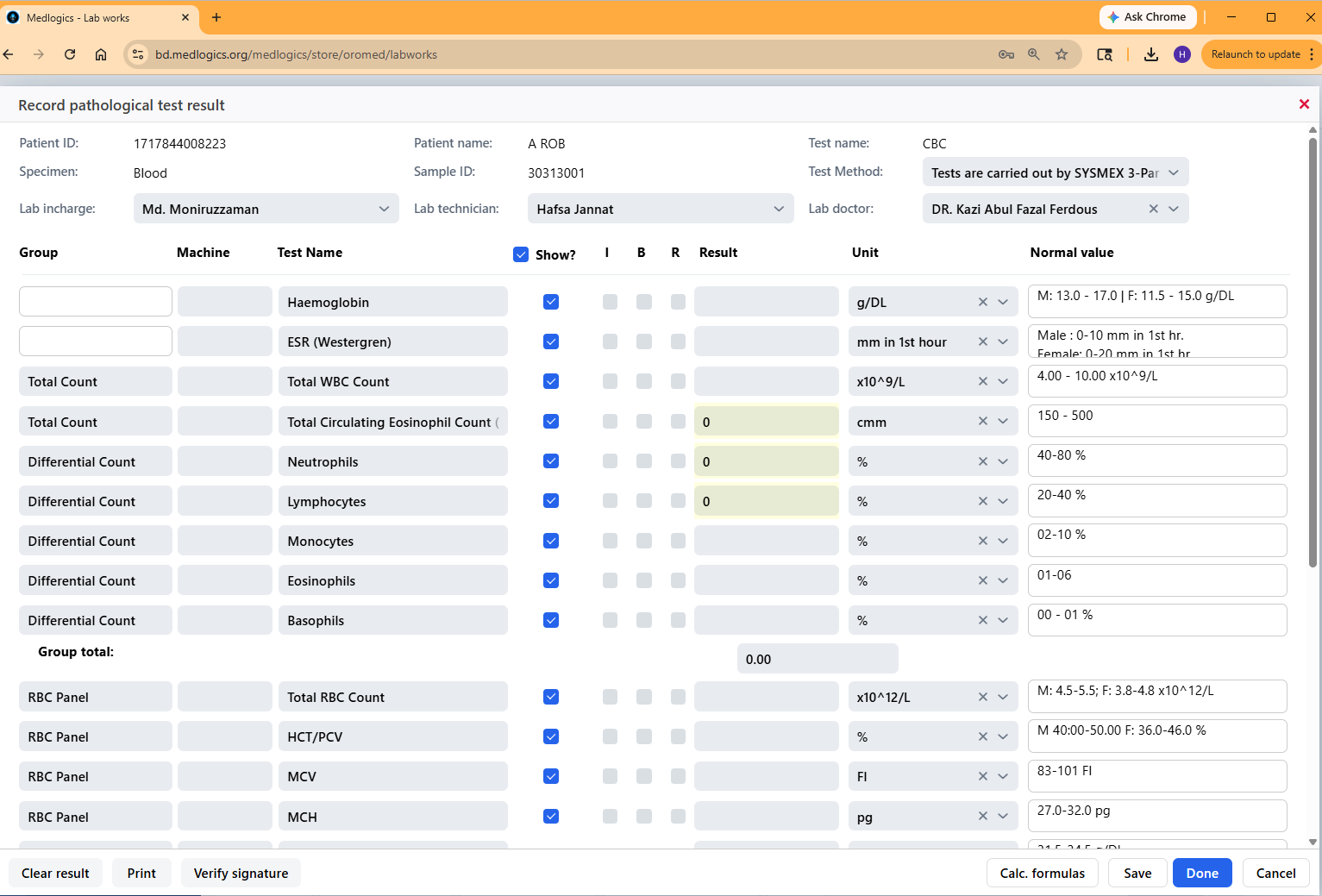
Looking at the Medlogics form against each of the 8 issues:
- Column headers are distinct and unambiguous — Group, Machine, Test Name, Result, Unit, Normal Value. Every column label describes exactly one thing.
- Test Method is a separate, clearly labeled dropdown — “Test Method: Tests are carried out by SYSMEX 3-Pu…” appears in its own labeled field at the top, not crammed into the test name column.
- Unit is fully visible in its own column — g/DL, mm in 1st hour, ×10^9/L — every unit is readable alongside its corresponding result.
- Patient ID and contact details are separate fields — Patient ID and Sample ID are distinct, labeled, and occupy their own horizontal space.
- No abbreviations that aren’t standard — every field label is written in plain, recognizable English. Nothing that requires decoding.
- Normal values are always visible — the Normal Value column shows full reference ranges (e.g., “M: 13.0–17.0 F: 11.5–15.0 g/DL”) without truncation.
- Specimen is populated and prominent — “Specimen: Blood” appears in the second row of the patient header, always visible, always filled.
- Doctor shown by name, not ID — “Lab doctor: DR. Kazi Abul Fazal Ferdous” — a human-readable name, not a database key.
Why This Matters More in Hospital Software Than Anywhere Else
You might accept poor UI in an internal inventory system or a back-office accounting tool. Staff learn workarounds. Errors get caught downstream. The cost of a bad UI is slow throughput and user frustration — annoying, but manageable.
In hospital and laboratory software, the cost profile is completely different.
Speed matters at scale. A large diagnostic lab processes 500–2,000 CBC tests per day. If a poorly designed interface adds even 20 seconds of friction per result — re-reading a truncated column, resolving an ambiguous label, manually checking a reference range that should be visible — that is 2–11 hours of wasted staff time, every day, on one test type alone.
Errors have clinical consequences. A misread unit (g/L vs. g/dL is a 10× difference), a missed specimen type, a wrong test method — these are not data entry mistakes. They are patient safety events. A form that makes these errors easier to make is a form that makes patients less safe.
Staff turnover and training cost. Unintuitive software drives experienced staff away and makes onboarding new staff slower and more expensive. In the Bangladeshi healthcare market, where trained lab technicians are in limited supply, software that can be learned in an afternoon versus software that requires weeks of mentored training represents a real operational difference.
Doctor trust in results. When a referring physician receives a CBC report and the specimen field is blank, or the method is illegible, or the reference range is cut off — their confidence in the result drops. That eroded confidence leads to repeat testing, delayed treatment decisions, and unnecessary consultations. All caused by a form that a competent designer could have fixed in a day.
The 6 Principles Good Healthcare UI Gets Right
Every label is a real word
No database column names. No unexplained abbreviations. If a user has to decode a label, the label has failed.
Clinical context is always visible
Reference ranges, units, specimen type, and test method are not optional — they are mandatory context for every result. They must never be hidden, truncated, or collapsed by default.
One field = one data point
Combining BedNo/MobileNo, TestName/TestMethod, or any two distinct values into one field is a database shortcut masquerading as a design decision. Every distinct data point deserves its own field.
Column widths reflect importance
The most clinically important columns — Result, Unit, Normal Range — should receive the most horizontal space. Decorative or system-internal fields should be the narrowest.
Internal IDs never appear in user-facing screens
Database foreign keys, sequential row IDs, and system reference numbers belong in the database. Users see names, descriptions, and meaningful identifiers — not numbers that mean nothing to them.
Design for the worst day, not the best
Clinical software is used when the lab is overwhelmed, the internet is unstable, and the technician is on hour ten of a twelve-hour shift. Design for that person, in those conditions — not for a well-rested user in a demo environment.
Closing Thought
The a widely-used LIS form in the screenshot above was not built by incompetent engineers. The data model is there. The logic works. The machine integration probably runs correctly. But the interface between that working software and the human being using it every day was built without care — or without anyone who had actually sat in a lab and watched a technician work.
Good healthcare UI is not about making things pretty. It is about eliminating every unnecessary cognitive step between a staff member and a correct clinical decision. That is the standard Medlogics builds to — and the standard every hospital software vendor should be held to.
Mahbub Alam is Product Design Lead at Medlogics. He has spent the last seven years working with pathology labs, diagnostic centers, and hospital administration teams across Bangladesh to understand how clinical workflows actually operate — and how software either supports or undermines them.